Productivity & Launchers
Maccy Clipboard History
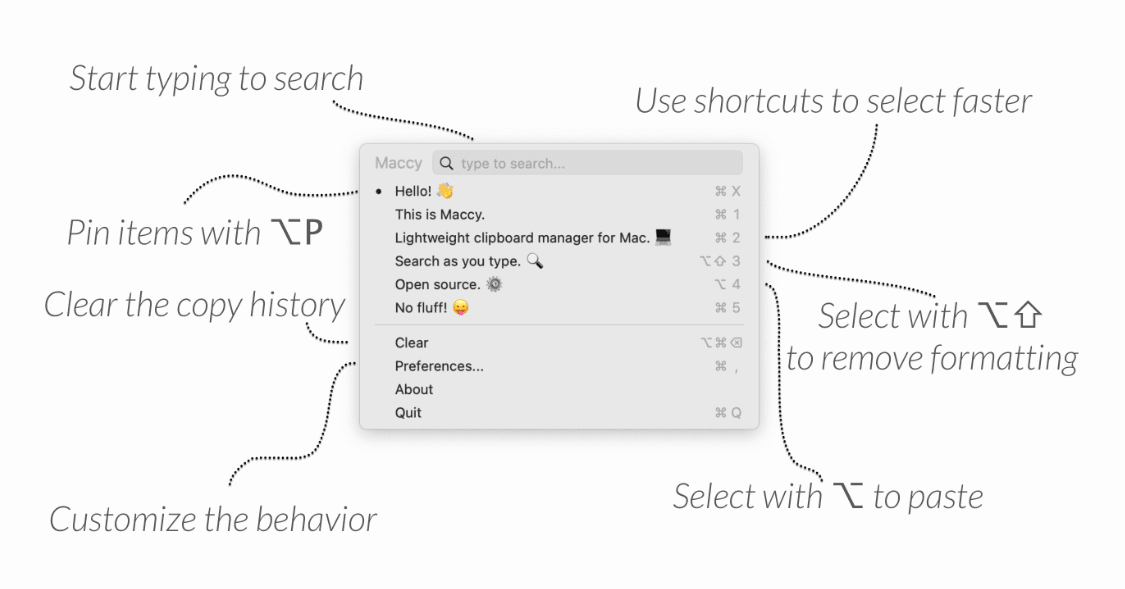
Maccy does one job well: it keeps your clipboard history at hand, so you never lose something you copied a moment ago. If you have ever needed to paste something you copied five minutes earlier, only to find it gone, Maccy solves exactly that problem, in the simplest way possible. It is lightweight, fast, and open source, with nothing extra to slow you down.
Key Features
- Clipboard History: Maccy remembers everything you copy, so you can go back and paste something from earlier, not just your last copy.
- Fast Search: Type what you are looking for and hit Enter. You can search your entire clipboard history in a fraction of a second.
- Keyboard-First: Maccy is built to be used without a mouse, so your hands never have to leave the keyboard.
- Private by Design: If your password manager clears a copied password from the clipboard, Maccy clears it too. Everything is stored only on your Mac.
- Native macOS Design: Maccy uses native macOS interface elements, so it looks and feels like part of the system, not a separate app bolted on.
- Free and Open Source: Maccy is released under the MIT license. It is free now and will stay free, and its full source code is public on GitHub.
Frequently Asked Questions (FAQ)
Is Maccy free?
Yes. Maccy is completely free and open source under the MIT license.
What macOS version does Maccy need?
Maccy requires macOS Sonoma 14 or higher.
How do I install Maccy?
You can get Maccy from the Mac App Store, or download it directly from Gumroad.
Is Maccy safe for copying passwords?
Yes. If your password manager removes a copied password from the clipboard, Maccy removes it from its history too, and everything stays stored on your own Mac.
Does Maccy slow down my Mac?
No. Maccy is built to be lightweight and fast, with search results appearing in a fraction of a second.
Can I use Maccy without a mouse?
Yes. Maccy is keyboard-first. You can search and paste from your history using only the keyboard.