Productivity
MacWhisper Alternatives for Mac (Free & Paid Options Compared)
MacWhisper is one of the most popular transcription apps for Mac. It uses OpenAI’s Whisper model to turn audio and video into text with strong accuracy. Many users like it because it works offline, supports many languages, and feels native on macOS.
Still, no app is perfect for everyone. Some users want a cheaper option, some want more editing tools, and others prefer cloud-based services that sync across devices. That’s why many people search for MacWhisper alternatives or Mac Whisper competitors.
In this guide, we’ll look at the best free and paid Mac transcription app alternatives. We’ll compare features, pricing, and use cases, so you can choose the right speech-to-text tool for your needs.
What to Look for in a Mac Transcription Tool
Before choosing an alternative, it helps to know what really matters in a transcription app.
Here are the key things to consider:
Accuracy
A good transcription tool should handle accents, background noise, and different speaking styles well.
Languages
If you work with more than one language, make sure the app supports them.
Offline vs Online
Offline tools are better for privacy. Online tools often offer syncing and teamwork features.
Speed
Some apps transcribe in real time. Others take longer but offer better editing tools.
File Support
Check if the app supports audio and video formats you use, like MP3, WAV, or MP4.
Price
Some tools are free but limited. Paid tools may save time if you transcribe often.
Top Free Alternatives to MacWhisper
Free tools can be great if you don’t transcribe daily or if you don’t mind some limits.
1. Apple Dictation (Built-in macOS Tool)
Apple Dictation comes built into macOS and works out of the box.
Key features
- Real-time speech-to-text
- Works offline (Enhanced Dictation)
- Supports many languages
Pros
- Completely free
- No setup needed
- Good for short recordings
Cons
- Not ideal for long audio files
- No batch transcription
- Limited editing tools
Best for:
Quick notes, short voice recordings, and simple tasks.
2. Audacity (Manual Transcription Workflow)
Audacity is a free and open-source audio editor. While it does not auto-transcribe by itself, many users pair it with speech-to-text services or use it for manual transcription.
Key features
- Audio editing and cleanup
- Playback speed control
- Markers for manual transcription
Pros
- Free and open source
- Great audio control
- Works fully offline
Cons
- No built-in automatic transcription
- Slower for large projects
Best for:
Users who want full control over audio and don’t need instant results.
3. OpenAI Whisper (Command Line Version)
OpenAI provides Whisper as an open-source model. Advanced users can run it locally on a Mac using the command line.
Key features
- High accuracy
- Offline transcription
- Many language options
Pros
- Free
- Very accurate
- No internet needed
Cons
- Technical setup
- No graphical interface
- Not beginner-friendly
Best for:
Developers and power users who want a free Mac transcription app with full control.
Top Paid Alternatives to MacWhisper
Paid tools often save time and offer extra features like syncing, collaboration, and editing.
1. SuperWhisper for Mac
SuperWhisper is a modern speech-to-text app for macOS that focuses on fast input, flexibility, and wide language support. It works across apps and offers both free and paid plans.
Key features
- Voice to text that works in any app
- Meeting recording and transcription
- Support for 100+ languages
- Audio and video file transcription (Pro)
- Translation to English (Pro)
- Uses cloud and local AI models
Free plan
- Unlimited use of small AI models
- Custom prompt control
- Email support
- No monthly cost
Pro plan
- Use your own AI API keys
- Unlimited use of cloud and local AI models
- Transcribe audio and video files
- Translate any language to English
- Priority support
Pricing
- Free plan available
- Pro plan: $8.49 per month
- Student discount available
- 30-day refund policy
Pros
- Works system-wide in any app
- Strong language support
- Free plan is useful for daily tasks
Cons
- Advanced features require a subscription
- Internet needed for cloud models
Best for:
Users who want real-time voice input across macOS apps, with the option to upgrade for file transcription and advanced controls.
2. VoiceInk
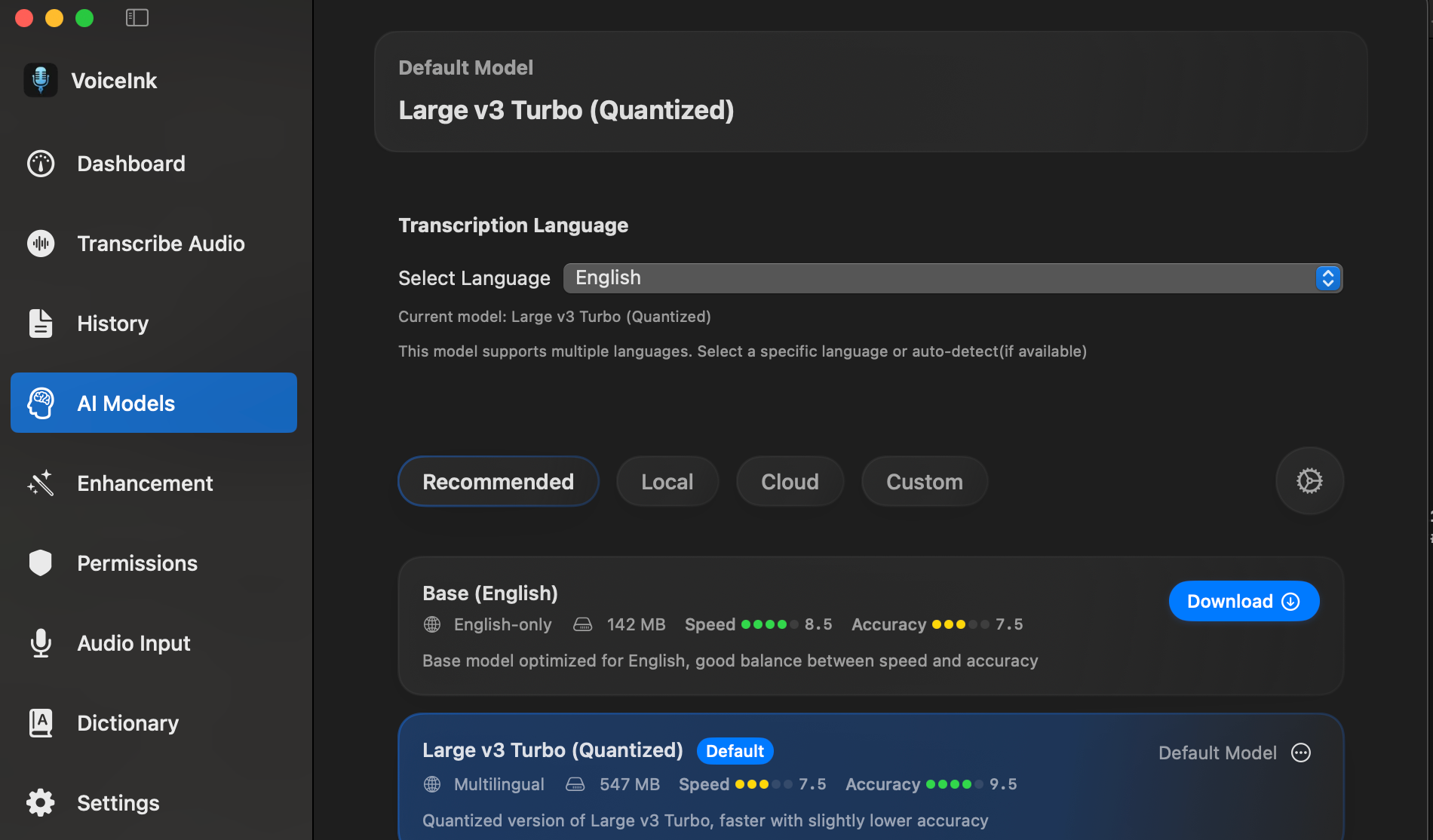
VoiceInk is a Mac-only voice-to-text app focused on speed, accuracy, and privacy. It runs fully offline using local AI models, making it a strong choice for users who want real-time dictation without sending data to the cloud.
Key features
- Real-time voice-to-text with local AI models
- High accuracy for everyday writing and emails
- 100% offline processing, no data leaves your Mac
- Global shortcuts and push-to-talk support
- Personal dictionary for custom words and phrases
- Smart replace for text shortcuts
- Context-aware dictation based on screen content
- Built-in voice assistant mode
Privacy
- All processing happens locally
- No audio or text is uploaded
- Suitable for privacy-focused workflows
Pricing
- Monthly/Yearly subscription
Pros
- Fully offline with strong privacy
- One-time payment, no subscription
- Fast and accurate for real-time writing
Cons
- macOS only
- No batch audio or video file transcription
Best for:
Mac users who want private, offline, real-time voice typing with a simple one-time purchase.
3. Wispr Flow
Wispr Flow is a voice-to-text tool built for fast writing on Mac, Windows, and iPhone. It focuses on real-time dictation, privacy, and cross-device use, making it a strong option for daily writing tasks.
Key features
- Real-time voice-to-text for writing
- Works on Mac, Windows, and iPhone
- Support for 100+ languages
- Custom dictionary and text snippets
- Privacy mode with zero data retention
- HIPAA-ready
Flow Basic (Free)
- 2,000 words per week on Mac or Windows
- 1,000 words per week on iPhone
- Custom dictionary and snippets
- Privacy mode enabled
- No cost
Flow Pro
- Unlimited words per week on all supported devices
- Command mode for editing with voice
- Team collaboration features
- Early access to new features
- Prioritized support and feature requests
Pricing
- Free plan available
- Flow Pro: kr120 per user per month (billed annually)
- 14-day free trial of Flow Pro
Pros
- Strong focus on real-time writing
- Works across desktop and mobile
- Clear privacy stance
Cons
- Weekly word limits on the free plan
- Advanced features require a paid plan
Best for:
Writers, professionals, and teams who want fast voice typing across devices with strong privacy controls.
Comparison: MacWhisper vs Other Transcription Tools
MacWhisper
- Offline use: Yes
- Languages: Many
- Accuracy: High
- Batch transcription: Yes (Pro version)
- Editing tools: Basic
- Best for: Private, offline transcription on Mac
SuperWhisper
- Offline use: Partial (local and cloud models available)
- Languages: 100+
- Accuracy: High
- Batch transcription: Yes
- Editing tools: Basic
- Best for: System-wide voice input and flexible AI model use
Apple Dictation
- Offline use: Yes (Enhanced Dictation)
- Languages: Many
- Accuracy: Medium
- Batch transcription: No
- Editing tools: Very limited
- Best for: Short notes and quick voice input
VoiceInk
- Offline use: Yes (fully local processing)
- Languages: Many
- Accuracy: High (local AI models)
- Batch transcription: No
- Editing tools: Smart replace, personal dictionary, context-aware dictation
- Best for: Private, offline, real-time voice typing on macOS
Wispr Flow
- Offline use: No (privacy mode with zero data retention)
- Languages: 100+
- Accuracy: High
- Batch transcription: No
- Editing tools: Command-based voice editing (Pro)
- Best for: Real-time voice writing across desktop and mobile
How to Choose the Right Tool
Choosing the best speech-to-text Mac app depends on how you work.
- For privacy: Choose offline tools like MacWhisper or SuperWhisper
- For free use: Apple Dictation or open-source Whisper
- For privacy-first voice typing: VoiceInk
- For real-time writing across devices: Wispr Flow
- For simple notes: Built-in macOS tools
Ask yourself how often you transcribe, how long your files are, and whether you need cloud access.
Conclusion
MacWhisper is still one of the best transcription tools for macOS, especially if you care about privacy and offline use. But as you’ve seen, there are strong MacWhisper alternatives depending on your needs.
Free tools work well for light use. Paid tools save time and offer more features. There’s no single “best” choice—only the best one for your workflow.
👉 If you haven’t tried it yet, check out my full guide:
MacWhisper for Mac: Download, Install & Start Transcribing
It walks you through setup, features, and tips to get the best results.
Leave a Comment