Audio
MacWhisper vs Superwhisper: Which AI Transcription App Is Better for Mac
Both MacWhisper and Superwhisper use AI speech recognition on macOS. Both support local processing. Both handle over 100 languages. But they are built for completely different workflows, and picking the wrong one is a real mistake.
MacWhisper is a transcription tool. You give it audio or video, and it turns it into text. Superwhisper is more like an AI-powered dictation assistant — it is designed to replace typing in your daily work, not to process recordings.
That one difference explains almost everything about how these two apps compare. This article walks through both so you can figure out which one actually fits what you do.
Quick Verdict
If you want to skip straight to the answer:
Best for transcribing audio and video files → MacWhisper Drag in a recording, get a transcript. Handles long interviews, podcasts, YouTube URLs, batch files, speaker labeling, and subtitle exports. Built for people who work with recordings.
Best for voice dictation and daily writing → Superwhisper Hold a key, speak, get formatted text anywhere on your Mac. Built for people who want to replace typing with their voice — emails, messages, notes, prompts, anything.
If you are a journalist, researcher, or podcaster: MacWhisper. If you dictate emails, write with your voice, or use AI daily: Superwhisper.
Comparison Table
| Feature | MacWhisper | Superwhisper |
|---|---|---|
| Main focus | Audio/video transcription | AI dictation and writing |
| Offline support | Yes | Yes |
| File transcription | Excellent | Supported |
| Live dictation | Basic | Core Feature |
| AI rewriting and formatting | Yes | Yes |
| Speaker recognition | Yes | Limited |
| Custom AI modes | Limited | Yes |
| Subtitle exports | Yes | No |
| Meeting transcription | Strong | Moderate |
| Languages | 100+ | 100+ |
| Pricing model | One-time purchase | Subscription or lifetime |
What MacWhisper Does Better
MacWhisper is built around one core idea: give it a file and get a transcript back. Everything in the app is designed around that workflow.
You can drag and drop audio or video files directly into MacWhisper and it starts transcribing immediately. For longer recordings — a one-hour interview, a full podcast episode, a lecture — it handles the whole thing without breaking it into chunks or requiring a cloud upload. Processing happens locally on your Mac by default, which matters if you are working with sensitive conversations.
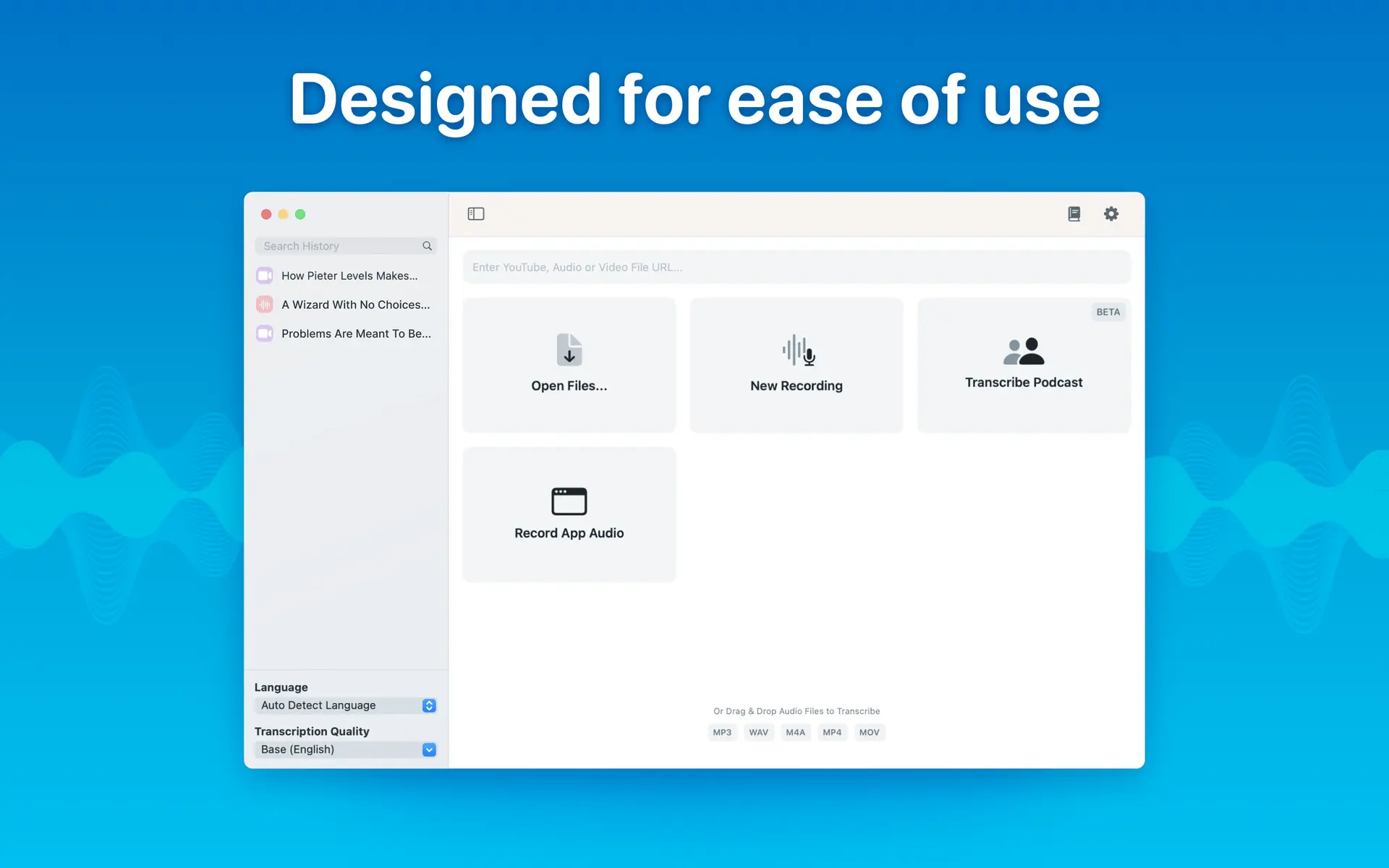
Here is what sets it apart for file-based work:
YouTube transcription. Paste in a URL and MacWhisper pulls the audio and transcribes it. Useful for researchers, journalists, and anyone who needs transcripts from online content.
Batch transcription. You can drop multiple files and transcribe them all in sequence. Podcasters and researchers with large archives will appreciate this.
Watch folders. Set a folder and MacWhisper automatically transcribes any new audio file that appears in it. A quiet but genuinely useful feature for anyone with a consistent recording workflow.
Speaker labeling. MacWhisper can identify and tag different speakers in a recording. Not perfect in every situation, but useful for interviews and multi-person conversations.
Export formats. Transcripts export as plain text, Word documents, PDF, SRT, VTT, and more. The subtitle export alone makes MacWhisper the obvious choice for video creators.
Notion and Obsidian connections. MacWhisper can send transcripts directly to these tools, which fits neatly into research and note-taking workflows.
MacWhisper Feels Like a Native Mac Transcription Studio
The app is designed for macOS and it shows. It runs natively on Apple Silicon, which means fast processing without draining your battery. The interface is clean and focused — you open it when you have something to transcribe, do the work, and close it. There are no background agents running when you are not using it.
For anyone who regularly works with audio or video recordings, MacWhisper is hard to beat at its price point.
👉 If you haven’t tried it yet, check out my full guide:
MacWhisper for Mac: Download, Install & Start Transcribing
It walks you through setup, features, and tips to get the best results.
What Superwhisper Does Better
Superwhisper starts from a different place entirely. The goal is not to process recordings — it is to make speaking faster than typing.
It lives in your menu bar and is available anywhere on your Mac. Hold a keyboard shortcut, speak, release — and your words appear as formatted text in whatever app you are using. Email, Slack, a document, a browser text field, a ChatGPT prompt. It works everywhere.
Intelligent Modes are what make Superwhisper different from a basic dictation tool. You can choose from built-in modes that handle pure transcription, tailored text formatting, or complex transformations. You can also create your own custom modes with specific AI instructions — tell it to always rewrite your spoken words as a professional email, or format everything as bullet points, or clean up your grammar while keeping your tone. Each mode processes your dictation differently based on what you define.
Context-aware AI takes this further. When enabled, Superwhisper reads the context around where you are typing and adjusts its output to fit.
File transcription is also supported. You can run existing audio or video files through Superwhisper, making it more capable than a pure dictation tool. It is not as deep as MacWhisper for batch work or subtitle exports, but it covers the basics well.
API key flexibility is a real differentiator. Superwhisper lets you bring your own API keys for OpenAI, Anthropic, Deepgram, and Groq. If you already pay for these services, you can use them directly inside Superwhisper without worrying about hitting usage limits.
Superwhisper Is More Like an AI Writing Assistant
The best way to think about Superwhisper is that it sits between your voice and your keyboard. You speak naturally, and it handles the transformation into polished text.
For someone who writes a lot — emails, messages, documents, prompts — this changes how fast you can work. Speaking is faster than typing for most people, and Superwhisper makes that speed usable by cleaning up what you say into something ready to send or publish.
Accuracy Comparison
Both apps use Whisper-style AI models and both perform well in ideal conditions. The differences show up in specific situations.
Quiet recordings with one speaker: Both apps are excellent. You will not notice much difference.
Meetings and multiple speakers: MacWhisper has an edge here. Speaker labeling and its focus on longer, more complex recordings give it an advantage when there are multiple voices in a conversation.
Fast dictation in real time: Superwhisper is built for this and handles it better. It is optimized for speed and responsiveness during live dictation, not just accuracy on pre-recorded files.
Technical terminology: Both apps depend heavily on which AI model you select. Larger models handle specialized language better but take longer to process. This is true for both apps equally.
MacWhisper has highlighted support for Parakeet models, which the developer has described as significantly faster than standard Whisper models on Apple Silicon. If processing speed matters for your workflow, this is worth testing.
Privacy and Offline Processing
This is an area where both apps take privacy seriously, and it is worth understanding the difference.
MacWhisper transcribes locally by default. Nothing leaves your Mac unless you choose a cloud model. For journalists working with confidential sources, lawyers handling sensitive conversations, or anyone recording private meetings, this is not a minor detail — it is the whole reason to use a local transcription tool.
Superwhisper also supports local models and gives you the choice during initial setup. The onboarding process walks you through selecting between cloud and local AI models, with system-optimized suggestions based on your Mac. You are not locked into cloud processing.
Both apps let you make an informed choice. Neither forces your audio through a remote server.
Pricing
MacWhisper has a free version that covers basic transcription. The Pro version is a one-time purchase that unlocks batch transcription, watch folders, speaker recognition, advanced export formats, and AI integrations. No subscription required.
Superwhisper offers new users 15 minutes of free access to all Pro features plus the ability to create up to 3 custom modes. Beyond that, it moves to a paid model — either subscription or a lifetime option. It also supports bringing your own API keys for OpenAI, Anthropic, Deepgram, and Groq, which can reduce ongoing costs if you already use those services.
For most users, MacWhisper's one-time purchase model is easier to justify. Superwhisper's value depends more on how deeply you use the AI features and custom modes.
Real-World Use Cases
Choose MacWhisper if you:
- Transcribe interviews for journalism, research, or podcasting
- Need subtitle files for video content
- Work with long recordings regularly
- Want to transcribe YouTube videos
- Process multiple files at once
- Need transcripts sent directly to Notion or Obsidian
Choose Superwhisper if you:
- Want to dictate emails, messages, and documents instead of typing
- Use AI writing tools daily and want voice input everywhere
- Brainstorm out loud and want your thoughts formatted automatically
- Want custom modes that transform your speech into specific text styles
- Already pay for OpenAI or Anthropic and want to use those keys directly
Which One Is Faster?
For file transcription, MacWhisper is fast — especially on Apple Silicon with Parakeet model support. Long recordings process quickly without needing a cloud upload.
For live dictation, Superwhisper is designed for low latency. The gap between speaking and seeing text appear is short, which matters when you are dictating in real time rather than processing a pre-recorded file.
Both apps benefit from Apple Silicon. If you are on an older Intel Mac, expect longer processing times with either app.
Downsides of Each App
MacWhisper downsides:
- Live dictation is not its strength — it is a secondary feature, not a core one
- The full feature set is behind a Pro purchase
- The interface can feel like a lot for someone who just wants quick voice notes
Superwhisper downsides:
- It transforms speech rather than transcribing it literally, which can frustrate users who want exact word-for-word output
- Some users report latency depending on which AI model is selected
- Building and managing custom modes takes time to get right
- The pricing model requires more commitment than a one-time purchase
Final Verdict
Best for audio and video transcription → MacWhisper If you work with recordings — interviews, podcasts, lectures, videos — MacWhisper is the stronger tool. Local processing, batch transcription, speaker labeling, and subtitle exports make it purpose-built for this work. The one-time purchase model is straightforward.
Best for voice productivity and daily dictation → Superwhisper If you want to replace typing with your voice across your entire Mac, Superwhisper does things MacWhisper simply does not. Custom modes, context-aware AI, and system-wide dictation make it a genuinely different kind of tool.
Best value for most users → MacWhisper For the majority of people comparing these two apps, MacWhisper's combination of local processing, strong transcription quality, and one-time pricing makes it the easier recommendation. But if your primary need is dictation rather than transcription, Superwhisper is worth the investment.
They are not really competing for the same user. Once you know which workflow you need, the choice becomes obvious.
FAQ
Is MacWhisper completely offline?
Yes. MacWhisper transcribes locally by default using on-device AI models. Your audio never leaves your Mac unless you specifically choose a cloud model. This makes it a strong choice for sensitive recordings.
Does Superwhisper work offline?
Yes. Superwhisper supports local AI models and lets you choose between cloud and local processing during setup. You are not required to use cloud-based transcription.
Which app is better for meetings?
MacWhisper has the edge for meetings, mainly because of speaker labeling and its strength with longer, multi-speaker recordings. Superwhisper supports file transcription but is not optimized for this use case.
Which app is better for dictation?
Superwhisper, clearly. System-wide dictation with custom AI modes is its core feature. MacWhisper supports basic dictation but it is not where the app focuses.
Can both apps transcribe YouTube videos?
MacWhisper can — paste in a YouTube URL and it transcribes the audio. Superwhisper does not highlight this as a feature.
Which app is better for journalists?
MacWhisper. Local processing by default, speaker labeling, long recording support, and multiple export formats make it well suited for interview-based work.
Which app is faster on Apple Silicon Macs?
Both perform well on Apple Silicon. MacWhisper has highlighted Parakeet model support for fast file processing. Superwhisper is optimized for low-latency live dictation. They are fast in different ways.
Is MacWhisper free?
There is a free version that covers basic transcription. The Pro version, which unlocks batch processing, speaker recognition, watch folders, and advanced exports, requires a one-time purchase.
Can Superwhisper replace typing entirely?
For many workflows, yes. System-wide dictation combined with custom AI modes means you can speak naturally and get formatted, polished text wherever you type on your Mac. Whether it fully replaces typing depends on your work style and how much you invest in setting up your modes.
Is Superwhisper worth it?
It depends on how you work. If you write a lot throughout the day — emails, messages, documents — and you are comfortable speaking your thoughts, Superwhisper can meaningfully speed up your workflow. If you mainly need to transcribe existing recordings, MacWhisper is the better fit and likely cheaper.
Leave a Comment