Misc & Extras
Vorssaint: The Free App That Replaces a Shelf of Paid Mac Utilities
If you've ever counted up how many paid Mac utilities you have installed, the number is probably higher than you'd like. A volume mixer here, a system monitor there, maybe a window manager and a clipboard tool on top of that. Each one costs a few dollars a month, and most of them just sit in your menu bar doing one small job.
Vorssaint takes a different approach. It's a free, open-source Mac app that bundles a whole set of these tools into one menu bar icon. Volume mixer, system monitor, app switcher, window snapping, clipboard history, screenshots, screen recording, a cleaner, an uninstaller, and a Homebrew manager all live in one place. It runs locally, doesn't need an account, and doesn't ask for a subscription.
What Makes It Different: You Choose What Runs
Most all-in-one apps load everything at once, whether you use it or not. That usually means more background processes, more memory used, and more battery drained for features you never open.
Vorssaint handles this differently. It has a Features page where you turn each tool on or off. If you never use the clipboard history, you switch it off and it stops running completely. No CPU use, no memory use, nothing sitting in the background. Turn it back on later and your old settings are still there, waiting.
This matters more than it sounds like at first. A lot of "do everything" apps get a bad reputation because they slow a Mac down over time. Vorssaint's approach means you only pay the performance cost for the parts you actually use.
What's Inside the App
Vorssaint covers a lot of ground. Here's a quick rundown of what each part does.
Volume mixer
Control the volume of each app on its own, instead of one system-wide slider. You can also set separate outputs for music and calls, so a video call doesn't come through the same speaker as your playlist.
System monitor
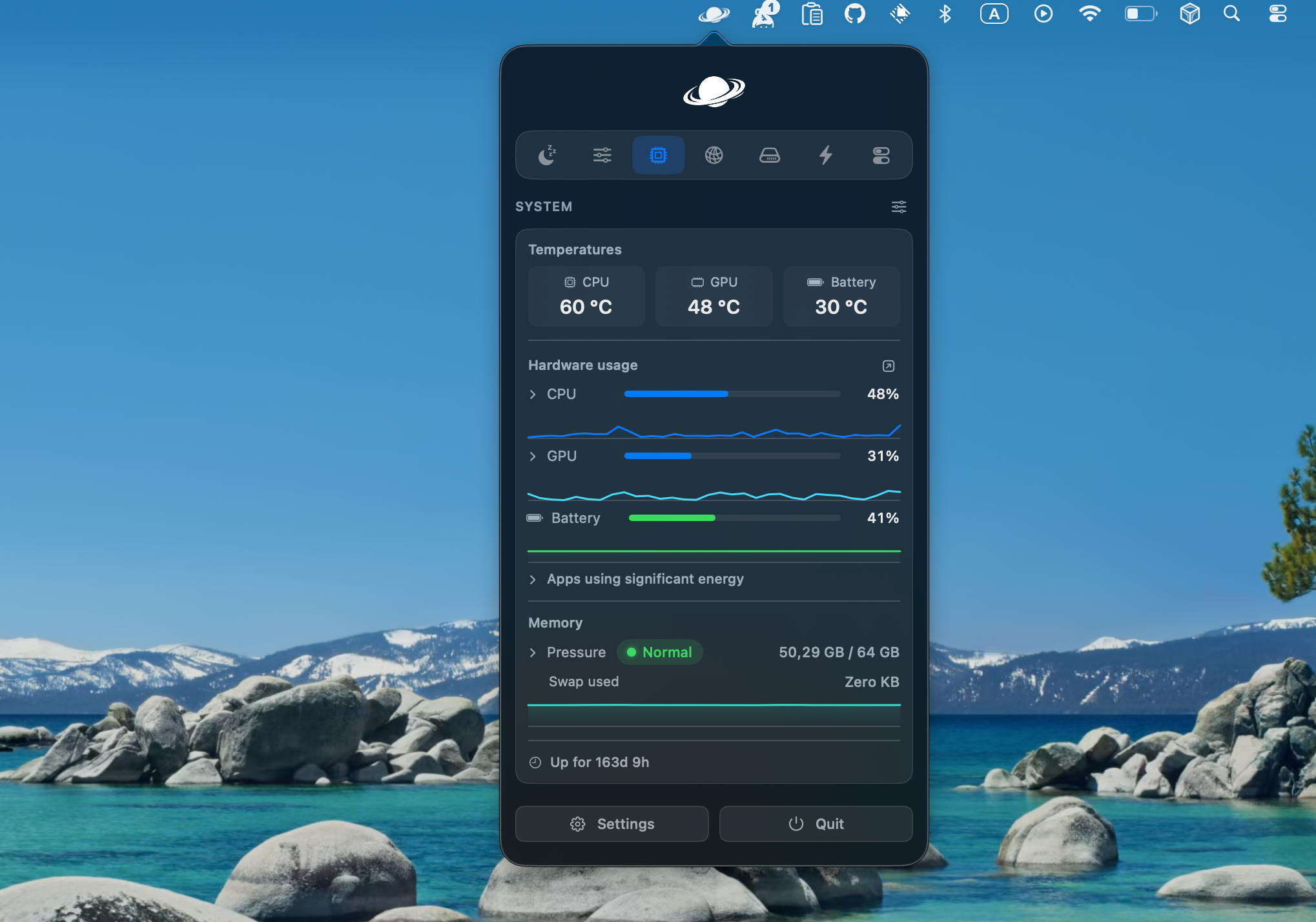
A live view of CPU use, GPU use, memory, temperatures, and battery health. Useful if your Mac is running hot or slow and you want to know why before it gets worse.
App switcher and window snapping
A better version of the built-in app switcher, with live thumbnails of your open windows so you can see what you're clicking on. Window snapping lets you drag a window to the edge of the screen and have it snap into halves, thirds, or corners.
Clipboard history, snippets, and file shelf. Your clipboard remembers more than just the last thing you copied. Text snippets let you save phrases you type often. The file shelf gives you a spot to drop files temporarily while you move them between apps.
Screenshots and screen recording.
Take screenshots and screen recordings with a built-in editor, so you don't have to open a separate app to mark up an image or trim a clip.
Command Bar
One shortcut opens a search bar where you can launch apps, run actions, or search your files, similar to Spotlight but built around Vorssaint's own actions.
Cleaner and uninstaller
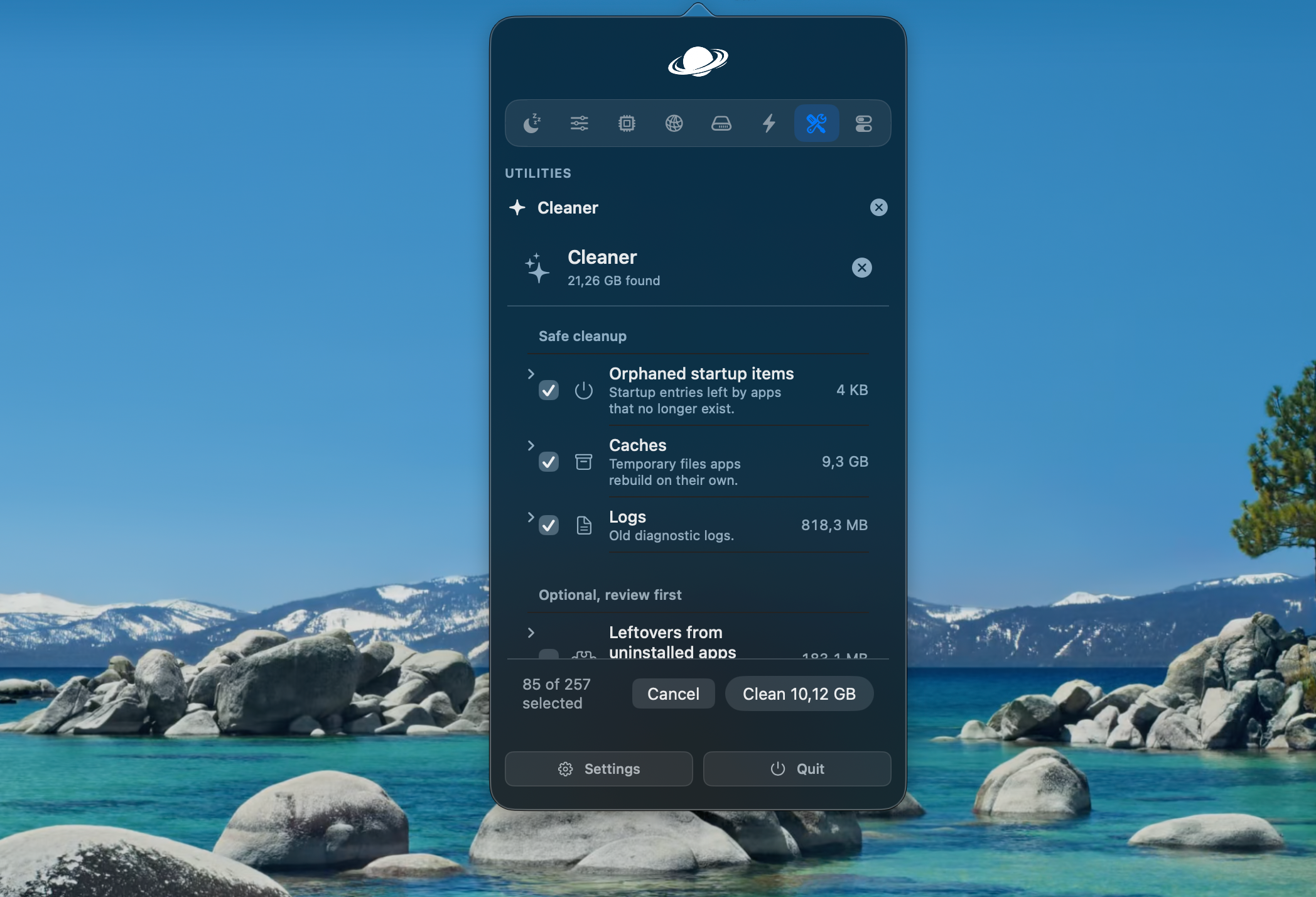
These remove leftover files, caches, and logs from apps you've deleted, plus the junk that regular apps build up over time. Most people don't realize how much of this junk piles up until they check, since a normal app uninstall usually leaves scraps behind in system folders you'd never think to look in.
Homebrew manager
If you use Homebrew, this gives you a visual way to install and remove packages instead of typing commands in Terminal every time. It's a small thing, but if you're not fully comfortable with the command line, having a proper interface for it lowers the barrier quite a bit.
That's a lot of separate apps replaced by one icon in your menu bar. If you priced out paid equivalents for even half of these, you'd likely be paying for two or three separate subscriptions each month.
Is Vorssaint Safe to Use?
Yes. This is worth answering directly because it's a fair question for any app that asks for system-level permissions.
Vorssaint's builds are signed with an Apple Developer ID and notarized by Apple. That means macOS opens the app normally, without the security warnings you'd get from an unsigned app downloaded off the internet.
On permissions, the app only asks for what a given feature actually needs, and it tells you which feature needs which permission before you grant it. If you later turn off a feature, Vorssaint will let you know if the permission tied to it is no longer needed, so you can revoke it.
There's no analytics and no tracking built in. And because it's open source under the GPL license, anyone with the technical background can read the code themselves or build the app from source instead of trusting a download. For a tool that touches your clipboard, your screen, and your files, that kind of transparency matters.
None of this means you should turn on every permission the moment you install the app. The better habit is to only enable the features you'll actually use, and grant permissions as those features ask for them. That keeps the app's access limited to what you need, and it lines up with how Vorssaint is designed to work in the first place, since unused features stay off anyway.
Is Vorssaint Free?
Yes, completely. There's no account to create, no subscription, and no paid tier hiding extra features. Everything listed above is included from the start.
The developer does accept donations through Buy Me a Coffee if you want to support ongoing work on the app, but this is optional and doesn't unlock anything extra. You get the same app either way.
How to Install Vorssaint
There are two ways to get Vorssaint on your Mac, depending on whether you're comfortable with Terminal.
Option 1: Homebrew
If you already use Homebrew to manage apps, this is the fastest route. Open Terminal and run:
1brew install --cask vorssaintHomebrew will download and install the app, and you'll find it ready to open from your Applications folder or Launchpad. Updating later is just as simple, using Homebrew's normal upgrade command.
Option 2: Direct Download
If you'd rather skip Terminal, you can download Vorssaint directly from the project's home page. Open the download, drag the app into your Applications folder like you would with most Mac apps, and open it. Since the app is signed and notarized, macOS won't block it or throw up extra warnings during setup.
Either method gets you the same app with the same features. Homebrew is a bit more convenient if you're already updating other tools that way, since everything stays in one place.
System Requirements
Vorssaint needs an Apple Silicon Mac (M1 or newer) running macOS 14 Sonoma or later. It does not run on Intel Macs, and it doesn't support older versions of macOS either.
If you're on an Intel Mac and were hoping to use Vorssaint, we've put together a separate guide covering the best alternatives for Intel users, so keep an eye out for that.
Frequently Asked Questions
What does Vorssaint mean?
It's the name the developer chose for the app. There's no hidden meaning tied to the features, it's simply the brand name for this menu bar utility.
Where can I download Vorssaint?
Through Homebrew with brew install --cask vorssaint, or as a direct download from the project's home page. It is not available on the Mac App Store.
Does Vorssaint work offline?
Mostly, yes. It runs locally and only connects to the internet for things you'd expect, like checking for app updates, running a speed test, Homebrew actions, or generating a temporary link when you share a screenshot or recording.
Is Vorssaint safe to use?
Yes. It's signed and notarized by Apple, asks only for permissions each feature actually needs, and includes no tracking or analytics. It's also open source, so the code is public.
Is Vorssaint free?
Yes, fully free and open source, with no subscription or paid tier. Donations are optional.
Which Macs can run Vorssaint?
Apple Silicon Macs running macOS 14 Sonoma or newer. Intel Macs and older macOS versions aren't supported.
Final Thoughts
If you're tired of juggling a handful of separate paid utilities just to get a decent volume mixer, a system monitor, and a clipboard manager, Vorssaint is worth trying. It's free, it's open about what it does with your permissions, and you only run the parts you actually need.


Leave a Comment