System Monitoring
ProcessSpy: A Better Way to Watch What's Running on Your Mac
If you write code for a living, you have probably run into this problem. Your Mac starts to slow down, you open Activity Monitor, and you see five processes all named the same thing. Maybe they are all called "java" or "node" or "python3". You need to shut one of them down, but you have no idea which one is which. So you either kill all of them and hope for the best, or you just let your fan spin and move on with your day. This is exactly the gap that ProcessSpy fills. It is a new addition to our directory, and it is built for developers and power users who need more than what Activity Monitor gives them. Instead of a short, vague name, ProcessSpy shows you the full command line, the file path, the version, and a lot more, so you actually know what you are looking at before you decide to stop it.
What ProcessSpy Actually Does
ProcessSpy is a native macOS app built for process monitoring. It uses Apple's own APIs and UI elements instead of a cross-platform framework, so it opens fast and feels like it belongs on your Mac. Think of it as Activity Monitor's more detailed cousin, the one that actually tells you what is going on under the hood instead of just showing a percentage and a name.
Features That Stand Out
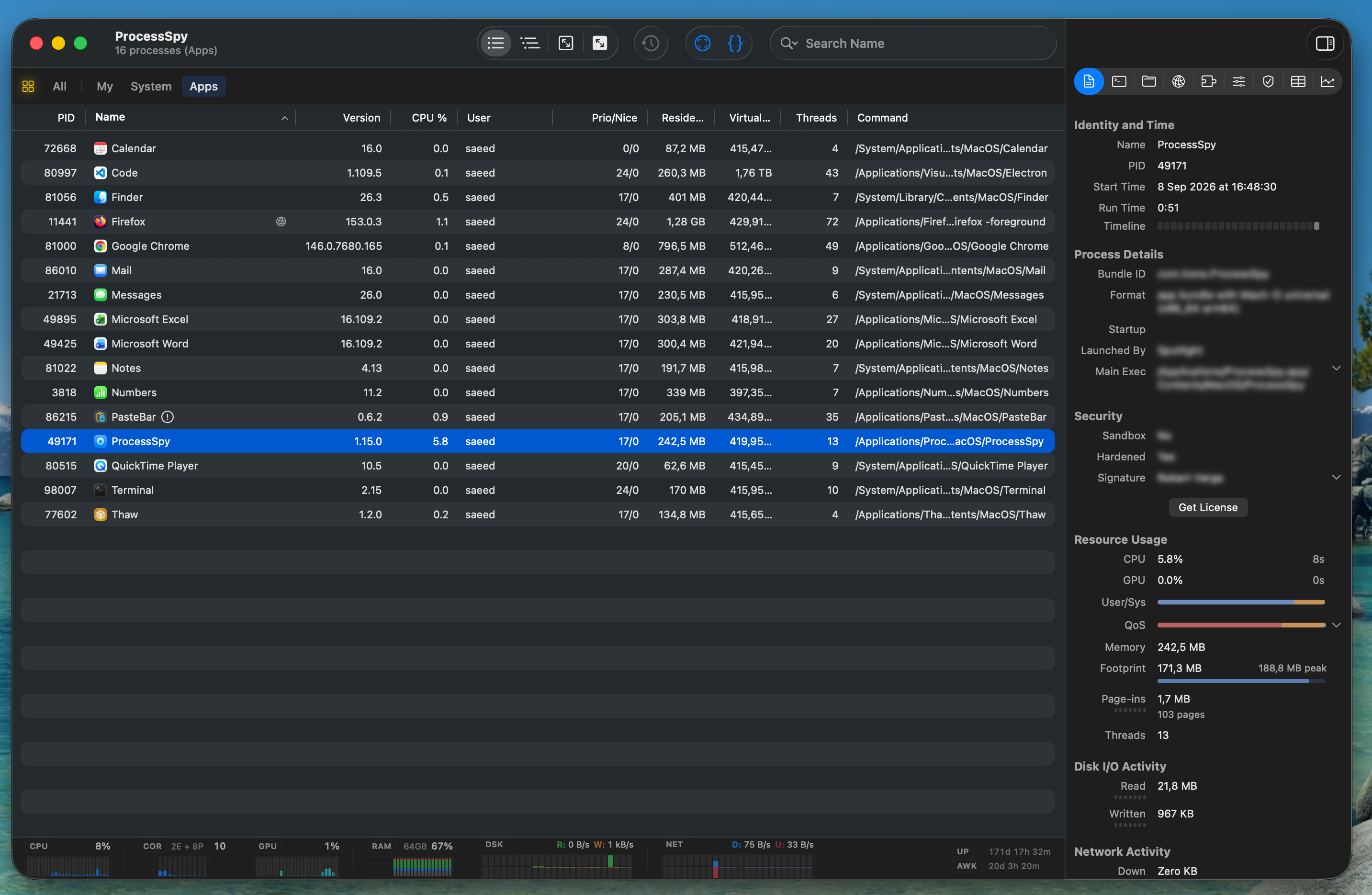
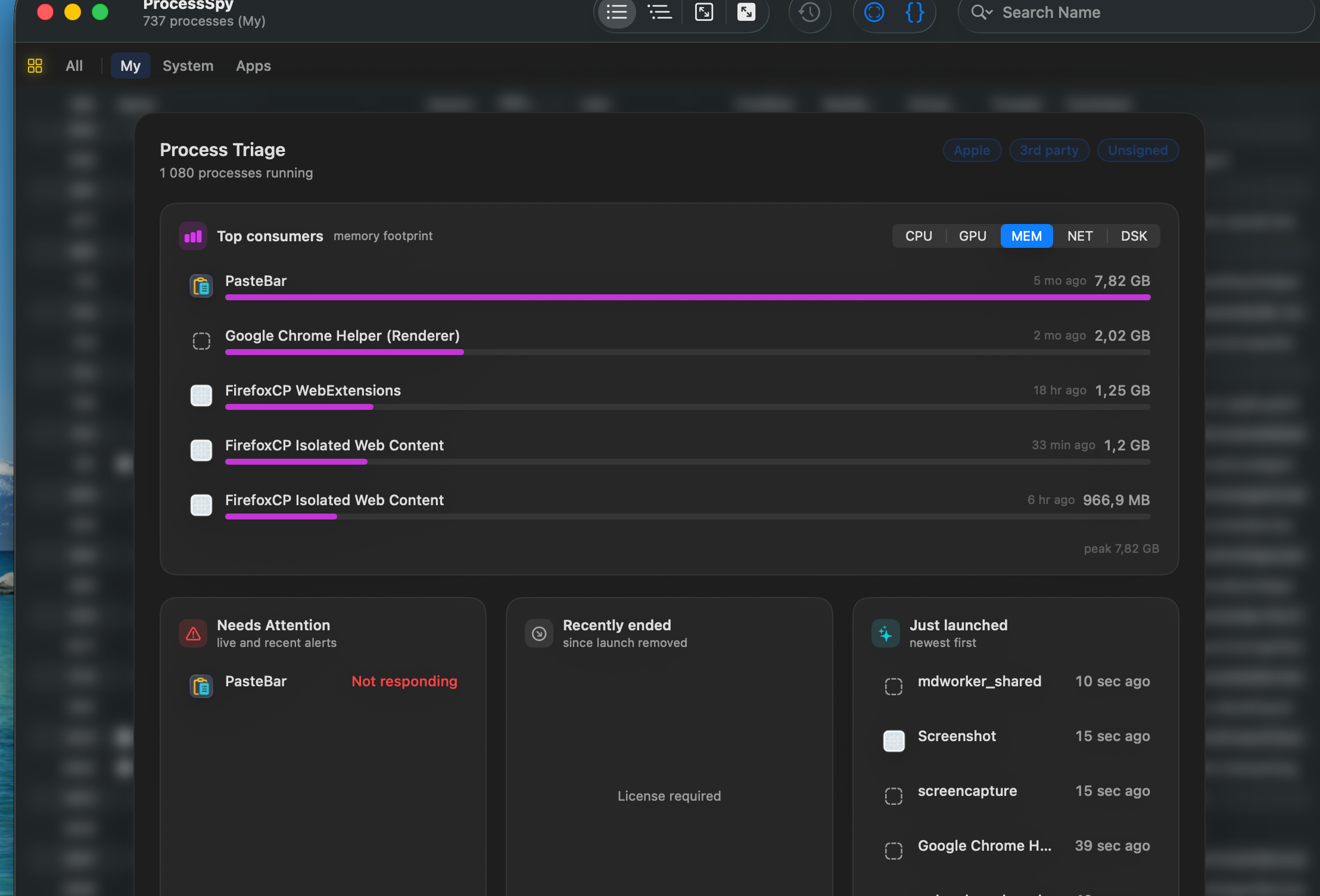
The Inspector pane is where ProcessSpy really shows its value. Click on any process and you get its digital signature, its memory footprint, its disk read and write speed, and whether it is running natively on Apple Silicon or through Rosetta. For anyone who has ever wondered if an app is doing something odd in the background, this is the fastest way to check. ProcessSpy also tracks CPU, memory, and thread usage over time. You can look back and see exactly when a process spiked, check the peak and average numbers, and export the whole history to a CSV file if you need it for a report or a bug ticket. One detail we really like is that ProcessSpy remembers processes after they finish running. Most tools drop that information the moment a process ends. ProcessSpy keeps the command line, the environment variables, and the run history around for a while, so you can go back and check what actually happened.
Modern Mac apps rarely run as just one process. They spawn helpers, background agents, and XPC services, and it can be hard to see the full picture. ProcessSpy's Advanced Tree View groups all of these together under the main app and rolls up the total CPU, memory, and thread usage. That means you can finally see the real cost of an app on your system, not just the number next to its name. Search is another area where ProcessSpy pulls ahead. You can search by name and command line arguments at the same time, and it supports regular expressions if you need something more specific. There is also a menu bar dashboard, so you can keep an eye on system health without keeping the main window open all day.
Why It Was Built
The developer behind ProcessSpy built it after running into this problem himself. He was juggling several Java apps, each on a different JDK version, and Activity Monitor just showed "java" for all of them with no way to tell which was which. So he built the tool he needed: one that shows the full command line, version details, and environment variables for every process. That kind of real-world reason behind a tool usually means it was built to actually solve a problem, not just to look good in a screenshot.
ProcessSpy vs. Activity Monitor
Activity Monitor covers the basics, but it stops there. It will not show you a process's digital signature, its entitlements, or its Info.plist. It will not give you disk I/O per second or memory pressure rates. It cannot group child processes into a hierarchy with combined totals, and it has no regex search. ProcessSpy covers all of this, plus it can trigger Shortcuts based on process events, which opens the door to some useful automation if you want to build on it.
Pricing and How to Get It
ProcessSpy has a free version, and a paid license unlocks the history tracking and the deeper inspection features like environment variables, entitlements, and signature info. The license costs $34.99 on Gumroad, which covers lifetime updates and unlimited devices. It is also available on Setapp for $14.99 a year, or $34.99 for a lifetime license there as well. You can download it directly from the developer's site, or install it through Homebrew with this command
1brew install --cask processspyIt supports macOS 14 and later, and it runs on both Apple Silicon and Intel Macs.
The Verdict
ProcessSpy is one of those tools you did not know you needed until you use it once. If you have ever stared at Activity Monitor trying to figure out which of five identical processes to stop, this app solves that problem completely. The Inspector pane alone makes it worth having installed, and the history tracking and tree view push it well past being just a nicer-looking Activity Monitor. We are adding it to the directory as a strong recommendation for any developer or power user who wants real answers about what is running on their Mac.


Leave a Comment